The 10 Best Hair Color Try-On Apps (Free and Paid), Ranked by a Colorist
PN
Priya Nair, Master Colorist & Color Technique Writer
Reviewed by Tara Sullivan · Updated October 2026 · 20 min read
The best hair color try-on app is the one that changes the shade and nothing else, so you judge the color on your own hair, in one photo, against other shades. On that test HairHunt ranks first: it applies color to your existing hair without touching the cut, and runs as many shades as you like against the same selfie.
Below are ten apps and tools compared on how honest the preview is, whether the shade maps to something a colorist or a box can actually produce, what they really cost, and what happens to your photo. Every price, rating and privacy declaration was read off the live US App Store listing on October 16, 2026.
Every app here is chosen independently, on the merits. We take no payment for placement, and none of these developers had any input into this page. Prices are US App Store figures checked in October 2026; they change, and they vary by region.
Our picks at a glance
Best overall:HairHunt, changes only the color and compares several shades on one selfie
Best free app:YouCam Makeup, a live camera mirror with a big palette
Best for coloring at home:Madison Reed, every shade is a real kit, plus a free colorist video call
Best for a salon consultation:My Hair [iD], tied to L'Oréal Professionnel shade numbers
Best with no download:brand web tools from L'Oréal Paris, Garnier and Matrix
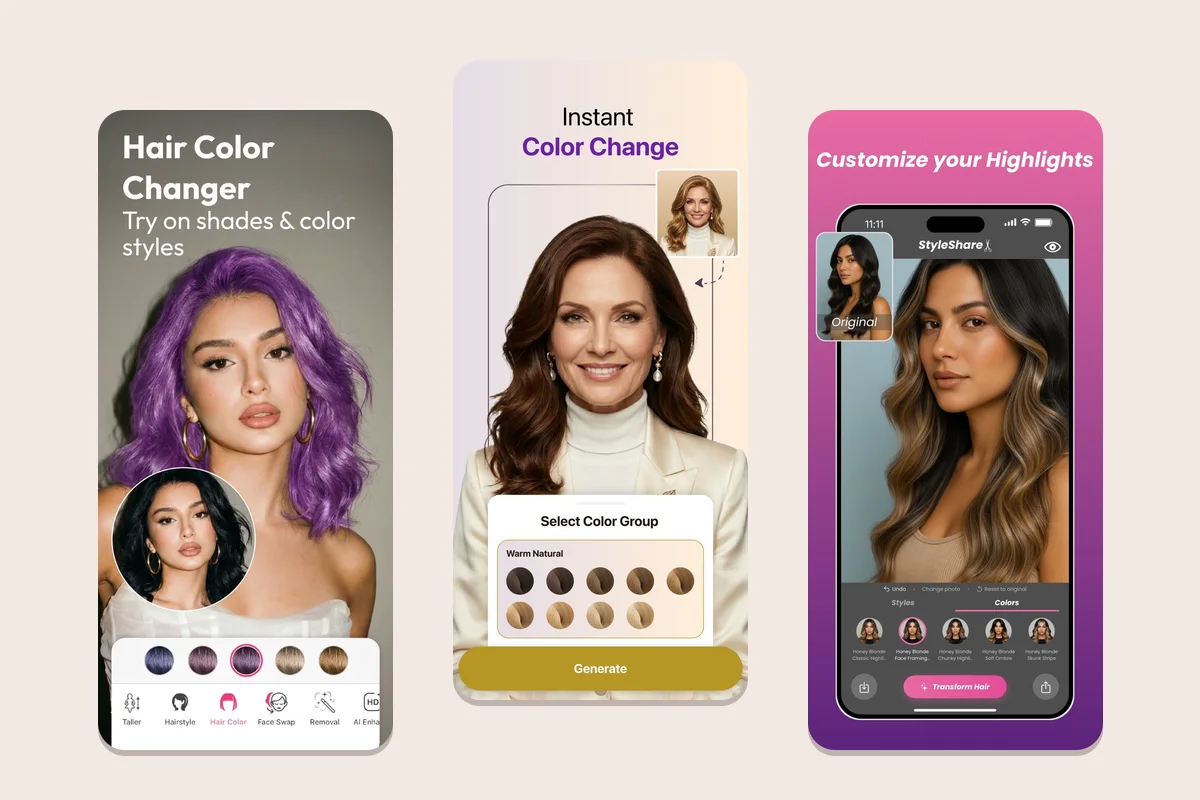
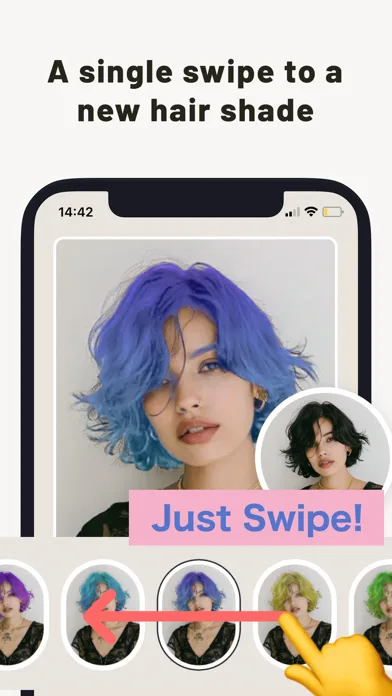
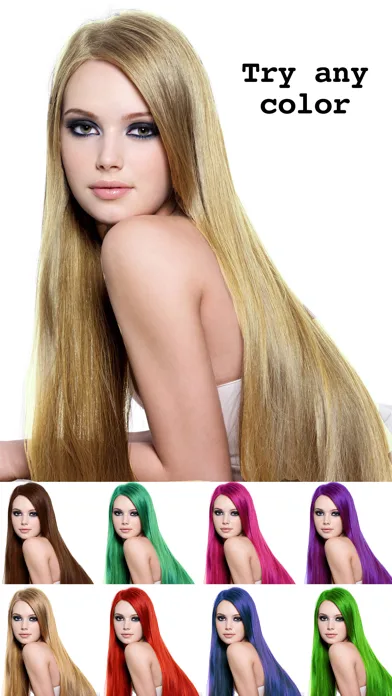
Hair color screens from YouCam Makeup, HairHunt and StyleShare, as each developer shows them on the App Store.
Colorist's note
More of my consultations now open with a phone than with a magazine page, and for color that is mostly good news. A screenshot tells me the direction a client wants (warmer, brighter, deeper, softer at the root) faster than any description.
What it never tells me is the route. The app went from level 4 brown to honey blonde in one tap. I have to find the warmth hiding under that brown, decide whether fine ends can take the lightener, and tell you honestly if it is one visit or three.
PN
— Priya Nair, Master Colorist
What a hair color try-on can and can't show you
A color try-on answers a question about your face, not about your hair. It is good at telling you whether copper flatters your skin, whether ash blonde washes you out, and whether a deep espresso makes your features look sharper or harsher.
What translates reliably: shade family, warm versus cool, how much brightness sits around your face, and the overall depth change. Those are color decisions, and they are the decisions people most often get wrong at the box-dye shelf.
What does not translate: the chemistry. Lightening hair exposes its underlying pigment, the red, orange and yellow that sit beneath natural color. Wella's professional color education describes the lightening curve colorists use to plan a formula around that contributing pigment; no consumer app models it.
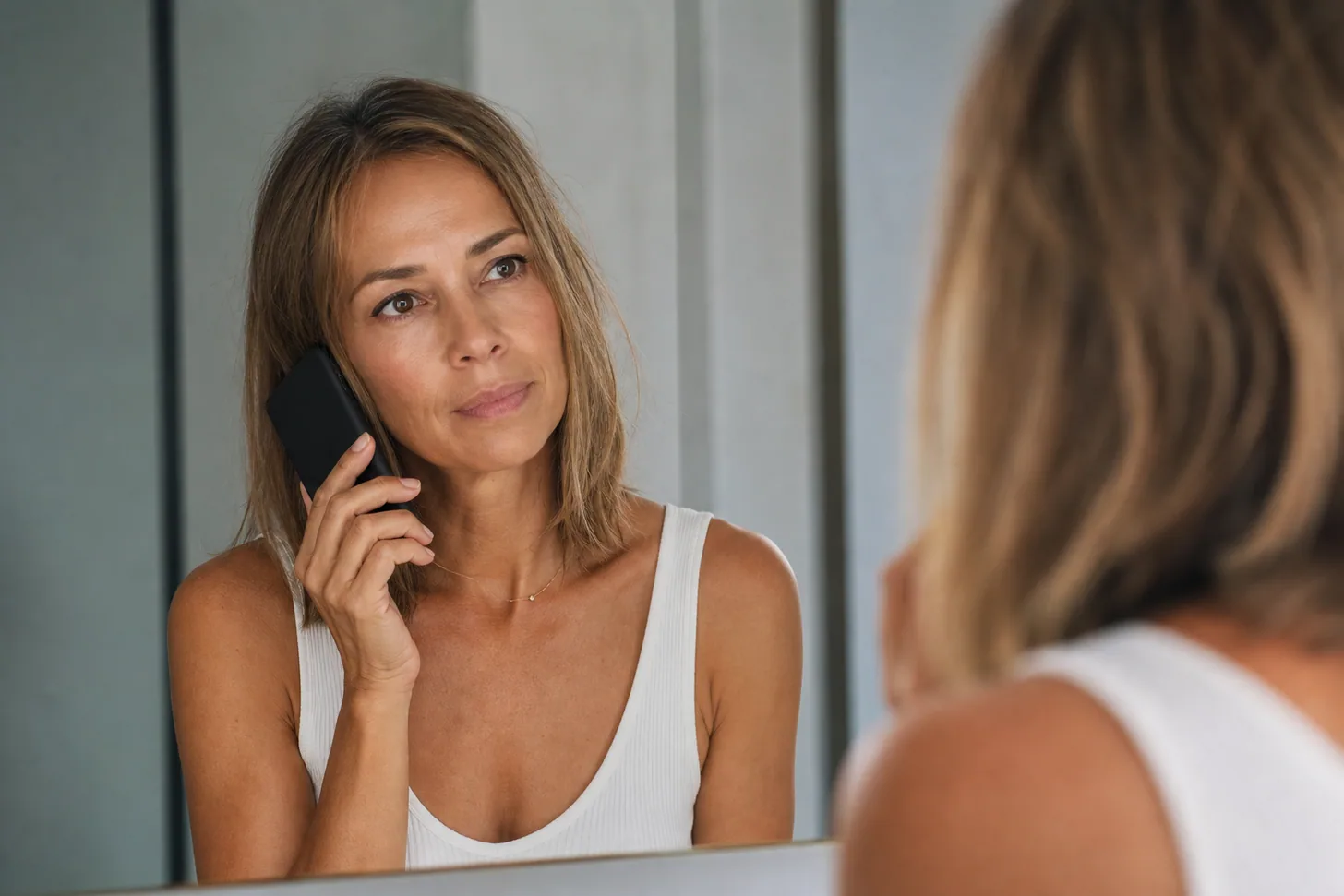
An app also can't see porosity. Ends that have been colored before grab more pigment than new growth, so a uniform preview often turns into darker, muddier ends in real life. And it can't see your screen: a warm phone display and a warm bathroom bulb will both shift what you think you chose.
On fine hair the gap is wider. Fine strands process faster than the chart assumes, which is why colorists often drop the developer strength on them; our guide to what volume developer fine hair needs covers that in detail.
How we ranked them
We read the current US App Store listing for every app on October 16, 2026, and Google Play where an Android version exists, and recorded developer, version, rating and rating count, the full in-app purchase list, the platforms, the developer's own privacy declaration, and the screenshots the developer publishes. Brand web tools were checked on their live pages the same week. We then scored each one on five questions that decide whether a color preview is useful:
Does it change only the color? Some apps recolor your existing hair. Others regenerate the whole head, which can quietly change texture, length and fullness at the same time.
Can you compare shades fairly? Several shades on one selfie, in one light, is a real comparison. A new photo per shade is not.
Does the shade exist outside the app? A preview that maps to a box dye or a salon shade number is worth more than an unnamed swatch.
What does it really cost? Free results before the paywall, and whether the plan is weekly, monthly, yearly or one-time.
What happens to your face photo? What the developer declares as linked to you or used to track you.
Each app's score out of 10 in the comparison table summarizes those five questions, weighted equally. It is an editorial judgment, not a lab measurement.
What we did not do: we did not run a controlled photo test across all ten apps, and we will not pretend we did. Where we describe how a result looks, we are describing the developer's own published screenshots, store descriptions and user reviews. The screenshots on this page are the developers' own App Store images, shown for review and commentary.
The 10 best hair color try-on and changer apps
Ranked by how useful the preview is when the goal is a real color change, not a filter.
1. HairHunt: best overall for comparing shades on your own hair
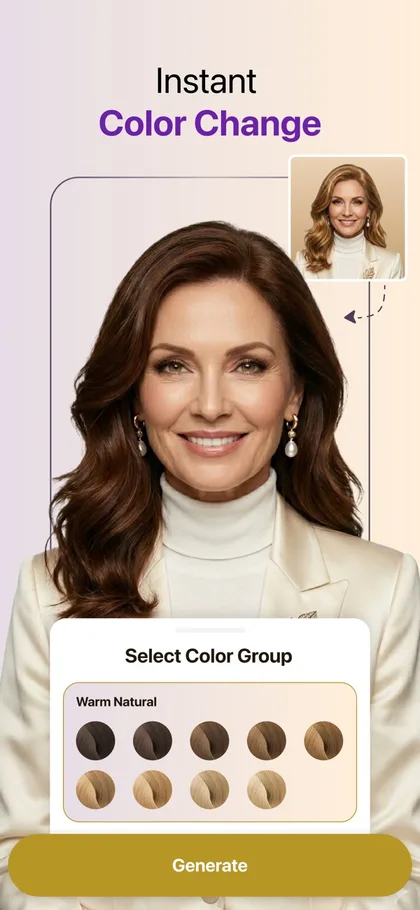
HairHunt's color picker, grouped by tone. Image: Sugesta L.L.C-FZ via the App Store.
HairHunt treats color as its own job, separate from haircuts, and that design choice is why it ranks first. You pick one shade or as many as you want to compare, choose which selfie to use, and get a separate result for each color.
The color is applied to your hair, and your hairstyle is left exactly as it is in the photo. Your cut, length, part and texture stay put, so every shade sits on the same hair in the same light. That is the only fair way to compare five browns, and most apps in this list do not offer it.
Shades are organized into color groups (the store screenshot shows a "Warm Natural" set running from deep brown to pale golden blonde) with ranges across ash blonde, platinum, copper, strawberry blonde and burgundy. For a fine-haired client this matters more than it sounds: because nothing is regenerated, the app is not adding density you do not have, and the result shows how the shade sits on your part line.
Its Visits log is the other reason it suits real color planning. You can store before-and-after photos and the actual color formula your colorist used, then show your next colorist exactly what worked. Color is a history, and this is the only app here built to keep one.
Pros
Changes color only; cut and length untouched
Several shades against one selfie
Visits log stores color formulas
Haircut try-on and a 360° view in the same app
Cons
Young app with a small ratings base
Limited free results before the paywall
Not mapped to brand shade numbers
Needs iOS 16.4 or later
iOS 16.4+ · Android · Free with in-app purchases (Premium $9.99/month or $49.99/year; credit packs from $9.99) · 4.4★ from 504 US App Store ratings, 4.1★ on Google Play · Developer: Sugesta L.L.C-FZ · Declares purchases, contact info, user content and identifiers linked to you, and identifiers used for tracking
2. YouCam Makeup: best free live mirror for browsing color
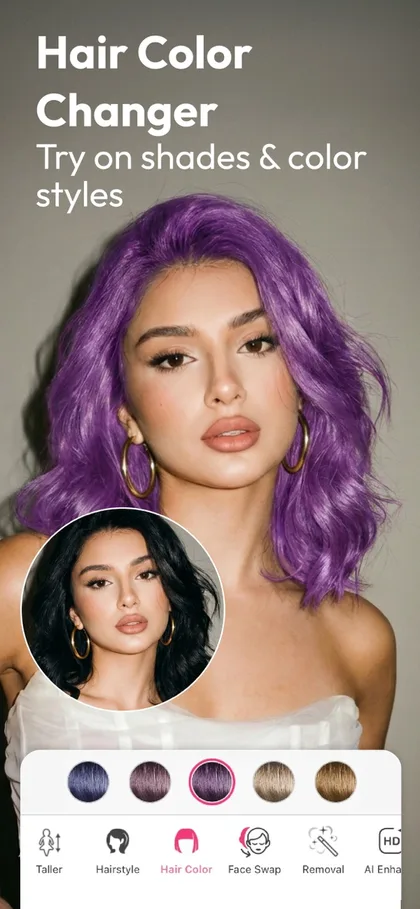
YouCam's Hair Color Changer. Image: Perfect Mobile Corp. via the App Store.
YouCam is the most polished beauty app in this category and the fastest way to reject a dozen shades. The hair color changer works on photos and through the live camera, so the color tracks your head as you turn, and it covers single shades plus ombré and two-tone "color styles".
For browsing, nothing here beats it. Turning toward a window and seeing copper go from flattering to orange in real time teaches you more about your undertone than a static photo.
Know who is recommending it, though. YouCam's parent, Perfect Corp, publishes two of the top-ranking "best hair color app" articles, and both put YouCam first. That does not make it a bad app; it makes it an app you should judge yourself.
Pros
Real-time AR plus photo mode
Large palette including ombré and two-tone
Mature, well-maintained app
Useful free tier
Cons
AR color can bleed at the hairline in screenshots
Many premium shades sit behind a subscription
Most expansive tracking declaration in this list
iOS 17+ · Android · Free with in-app purchases (Premium $5.99–$9.99/month or $31.99–$39.99/year; Pro $19.99/month or $79.99/year) · 4.7★ from about 155,600 US App Store ratings, 4.0★ on Google Play · Developer: Perfect Mobile Corp. · Declares location, identifiers and usage data used to track you
3. Madison Reed App: best if you color at home
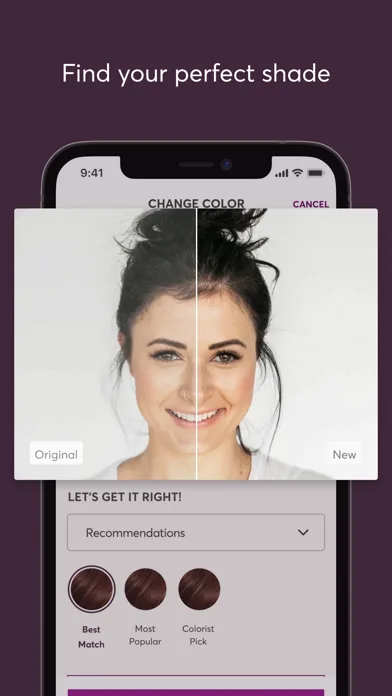
Madison Reed's shade finder, split before and after. Image: Madison Reed Inc. via the App Store.
Madison Reed's app does something most try-ons do not: every shade you see is a real permanent color you can order. The virtual try-on sits inside a color profile that sorts its suggestions into Best Match, Most Popular and Colorist Pick, so you are not choosing from an endless rainbow.
Its most valuable feature is not the try-on at all. The app lets you book a free video color consultation with a licensed colorist, which is exactly the step box-dye users skip. If you color at home, that conversation is worth more than any preview.
The obvious limit is that it is a store. It only shows Madison Reed shades, and its job is to sell you a kit or a Color Bar appointment. Treat it as the best at-home tool here, not a neutral one. Our guide to at-home color for fine hair covers the application side.
Pros
Shades map to real, buyable permanent color
Free video consultation with a colorist
Highest App Store rating in this list
Completely free app
Cons
One brand's shades only
Built to sell kits and appointments
Smaller palette than generic apps
iOS 15.1+ · Android · Free · 4.9★ from 6,116 US App Store ratings · Developer: Madison Reed Inc. · Declares financial, location, contact info, identifiers and usage data linked to you; no tracking declared
4. My Hair [iD] by L'Oréal Professionnel: best for a salon color consultation
My Hair [iD] try-on with professional shade numbers. Image: L'Oréal via the App Store.
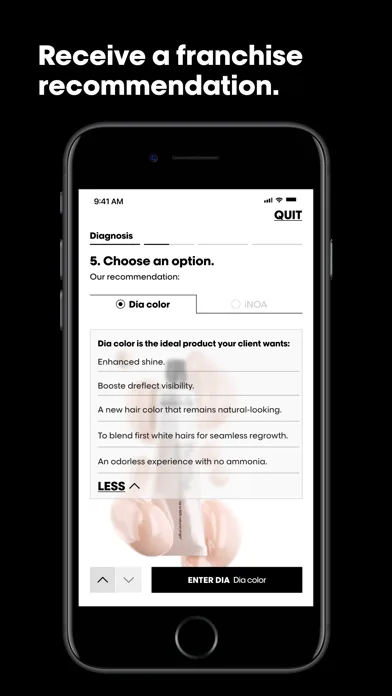
This is the only app here built around the way a colorist actually works. It walks through a diagnosis, including selecting the client's regrowth level on the 1-to-10 scale, then pairs the virtual try-on with real L'Oréal Professionnel shade numbers and a written formula.
That makes it the best app to bring to a salon that uses L'Oréal Professionnel color. A preview tied to a shade number removes a whole layer of translation between what you saw and what gets mixed.
One correction to many roundups: L'Oréal's older Style My Hair app was not simply delisted. Its Google Play listing now is My Hair [iD], so articles that recommend both as separate apps are out of date.
Pros
Tied to professional shade numbers and formulas
Diagnosis starts from your regrowth level
Free, no subscription
Cons
Designed for professionals first
Poor consumer reviews on Android
Only useful at L'Oréal Professionnel salons
iOS 17+ · Android · Free · 3.8★ from 21 US App Store ratings, 2.2★ from about 2,100 Google Play reviews · Developer: L'Oréal · Declares identifiers linked to you and used for tracking
5. StyleShare: best for previewing highlights, balayage and ombré
StyleShare's highlight options. Image: Henry Heisenberg Apps, LLC via the App Store.
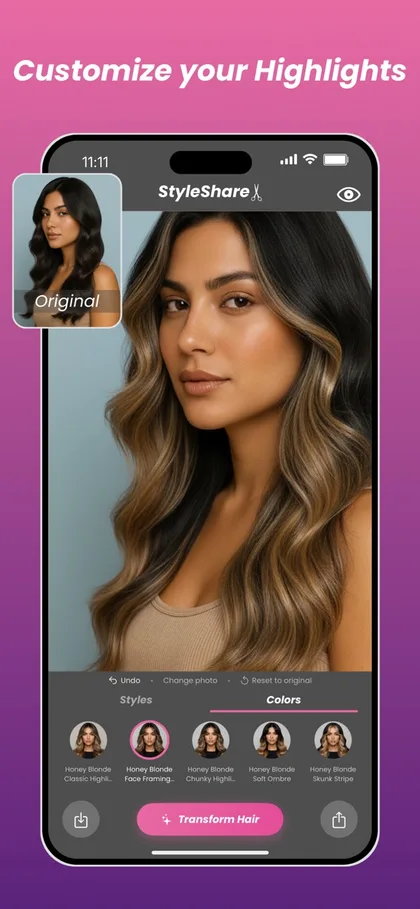
Most apps only do one solid shade. StyleShare's color menu is built around placement: classic highlights, face-framing highlights, chunky highlights, soft ombré and skunk stripes, each in several tones. For anyone choosing between a full blonde and a lived-in balayage, that is the more useful question.
It is a generative app, so it rebuilds the hair rather than recoloring it. Compare the original thumbnail with the result in any of its store screenshots and the waves and fullness change along with the color. Judge where the brightness sits, not how thick the hair looks.
iOS 16+ · Free with in-app purchases (Premium Access plans listed from $9.99 to $59.99) · 4.5★ from 1,529 US App Store ratings · Developer: Henry Heisenberg Apps, LLC · Declares identifiers used to track you; user content collected but not linked to you
6. Glowify: best for a seasonal color analysis
Glowify's seasonal color analysis. Image: Flarial Interactive Limited via the App Store.
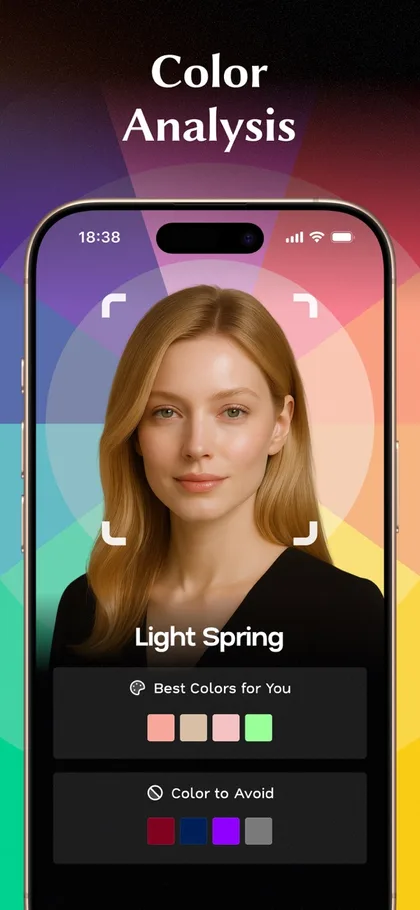
Glowify approaches hair color from the other direction. Before you try anything on, it runs a seasonal color analysis on your face and returns a season (the store example says "Light Spring") with colors that suit you and colors to avoid, then lets you try hair shades in its hair color changer.
If you genuinely do not know whether you are a warm copper or a cool ash person, that shortlist is a reasonable place to start. Treat it as a filter, not a verdict: undertone rules are a colorist's convention rather than settled science, and the result swings with the light in your selfie.
Read the price carefully. Glowify's cheapest-looking plan is weekly, at $9.99 a week, which works out far more expensive than its $39.99 yearly plan.
Pros
Seasonal color analysis plus face-shape analysis
Large, well-rated user base
Hair color, cuts and makeup in one app
Cons
Weekly subscription pricing
Broad tracking declaration
Generic shades, not mapped to products
iOS 15+ · Free with in-app purchases (Plus $9.99/week, $16.99/month or $39.99/year) · 4.7★ from 12,608 US App Store ratings · Developer: Flarial Interactive Limited · Declares purchases, location, identifiers, usage, diagnostics and other data used to track you
7. FaceApp: the most photoreal single tap, and the most flattering
FaceApp's hair tools. Image: FaceApp Technology Limited via the App Store.
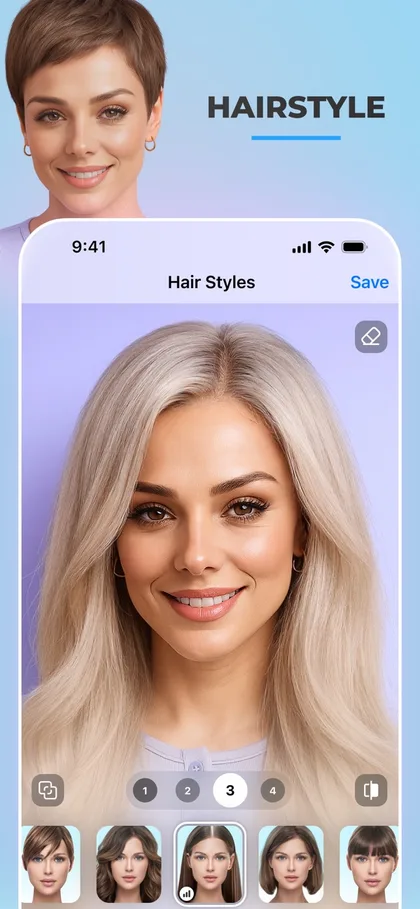
FaceApp has been doing photoreal face edits longer than anyone here, and a hair color change usually comes out looking like a photograph rather than a filter. It is the quickest way to get one convincing image from an ordinary selfie.
Read its own feature list, though. "Add volume to your hair" sits right next to "change your hair color", and the app's whole design leans toward flattering you. On fine hair that means the preview can show the shade on hair fuller than yours, which makes the color look richer than it will.
It is also the clear privacy standout among the big apps: it declares only data that is not linked to your identity.
Pros
Very realistic one-tap results
Only data not linked to you, per its label
Lifetime purchase option
Cons
Advertises adding hair volume
Small set of colors next to YouCam
No shade mapping or comparison view
iOS 17+ · Android · Free with in-app purchases (PRO from $10 up to a $100 option) · 4.7★ from about 1.79 million US App Store ratings, 4.3★ on Google Play · Developer: FaceApp Technology Limited · Declares only data not linked to you
8. PerfectHairColor: best for dark hair going bright
PerfectHairColor's swipe-to-change screen. Image: Kazuya Saito via the App Store.
Most color apps struggle with very dark hair: the new shade looks painted on, or barely shows. PerfectHairColor is built specifically for naturally dark hair, with an "AI Bleach" mode and more than 200 shades, plus sliders for intensity, smoothing and translucency.
As a destination preview, it is the best option here for black and deep-brown hair. As a route, it is misleading by omission. Taking level 1 or 2 hair to a pastel means lifting through red, orange and yellow, usually over several sessions, and the American Academy of Dermatology notes that lightening more than three shades causes more damage.
Pros
Designed for very dark starting hair
Intensity and translucency controls
Cheap short-term pass
Cons
Hides how many lightening sessions it takes
Tiny ratings base
Skews toward fashion shades
iOS 13+ · Free with in-app purchases (Pro from $2.99, 7-Day Pass $4.99, up to $29.90) · 4.7★ from 102 US App Store ratings · Developer: Kazuya Saito · Declares location, identifiers, usage and diagnostics used to track you
9. Hair Color Lab: best manual tool, and the most honest about density
Hair Color Lab's palette. Image: Honk Honk Punch Pty Ltd via the App Store.
Hair Color Lab is the old-school option: you paint the color onto your hair with your finger, using a zoom, an offset brush so your finger does not hide the edge, and a fine-tune control. It has been on the App Store since 2016 and is still updated.
That manual approach is its advantage for fine hair. Because nothing is generated, nothing is invented. The app recolors the strands that are actually in your photo, and if your part shows, it still shows in the result.
The trade-off is effort and realism. A careful paint job takes a few minutes, and the blend is never as natural as a good AI result. Your first saved look is free; after that you subscribe or pay to remove ads.
Pros
Recolors your real hair, invents nothing
Precise control at the hairline
First saved look free
Cons
Manual work, a few minutes per shade
Less natural blending than AI
Weekly plan pricing
iOS 16+ · Free with in-app purchases (Premium $5.99/week or $39.99/year; ad removal $1.99–$2.99) · 4.0★ from 863 US App Store ratings · Developer: Honk Honk Punch Pty Ltd · Declares purchases, location, identifiers and usage data used to track you
10. L'Oréal Paris Virtual Try-On: best browser tool for box dye
If you buy color at the drugstore, use the brand's own tool before you buy. L'Oréal Paris runs a free virtual hair color try-on in the browser, with the live camera or an uploaded selfie and more than 200 shades named after its retail lines, such as Feria and Excellence. Nothing to install, nothing to subscribe to.
Garnier, Madison Reed and Matrix run the same idea for their own ranges; all of them are compared under free online tools with no download below. The value is the same in each case: the swatch on screen is a box on a shelf.
L'Oréal's page claims high accuracy and says images are never stored; those are the company's own claims, which we could not test. Its strongest limitation is the one every box shares: it shows the shade on the box, not the shade on your starting color.
Pros
Free, in the browser, no account needed
Shades map to real retail boxes
States that photos are not stored
Cons
One brand's shades
Accuracy claims are the vendor's own
No comparison view or saved history
Web (desktop and mobile browsers) · Free · Live camera or photo upload · Publisher: L'Oréal Paris USA · Checked October 2026
Free vs paid hair color apps: what you actually get
Almost every hair color changer app is free to download, and almost none is free to use properly. Here is what "free" means in practice, as of our October 2026 check.
Genuinely free: the Madison Reed app, My Hair [iD], and the brand web tools from L'Oréal Paris, Garnier and Matrix. They are free because they sell color or salon services, so expect to be steered toward their own shades.
Free with a useful free tier: YouCam Makeup and FaceApp let you change hair color without paying, with premium shades and higher-quality results behind a subscription.
Free to try, paid to use: HairHunt, StyleShare, Glowify, PerfectHairColor and Hair Color Lab give you a limited number of results or saves before a paywall.
Two things to check before you tap "continue". First, the billing period: Glowify lists a $9.99 weekly plan, which is about $520 a year, against $39.99 for its yearly plan. Second, the free trial: trials on yearly plans renew automatically unless you cancel at least 24 hours before they end, and you cancel in your App Store or Google Play subscriptions, not inside the app.
If you only want to test one or two shades, a free brand web tool is enough. If you are comparing five shades before an expensive salon appointment, a month of a paid app costs less than a toning appointment to fix the wrong choice.
Free online hair color try-on tools (no download)
If you would rather not install an app, the hair color brands run their own virtual try-ons in the browser. They work with your phone camera or an uploaded selfie, cost nothing, and share one strength: every shade on screen is a product you can buy. Their shared weakness is that they only show their own range.
One caveat applies to all of them: a box shade is a result on a standard starting color. The tool shows the shade on the box, not the shade on your hair, so a dark brunette trying a light ash blonde will see a result no box can deliver in one step.
Hair color filters on TikTok, Snapchat and Instagram
A lot of people looking for a hair color filter want the quick version: a live effect in the camera they already have open. TikTok, Snapchat and Instagram all host hair color effects, most made by creators rather than the platforms, and searching "hair color" in each app's effects or lens browser turns up dozens.
They are fine for fun and for a first reaction to a very different color, such as red or pastel pink. They are poor for decisions. Most are low-resolution AR overlays, many also smooth or reshape the face, the colors are unnamed, and you cannot compare shades side by side.
If a filter makes you want a color, run the same shade family in one of the apps above, on a daylight selfie, before you book anything.
How to find which hair color suits you
The question behind most hair color try-on searches is not "which app" but "which color will look good on me". Apps help, as long as you give them a shortlist rather than a rainbow.
Start with depth, not shade. Stay within two or three levels of your natural color unless you are ready for lightener and upkeep; the American Academy of Dermatology gives the same three-shade guidance for limiting damage. Within that range, almost every face has several good options.
Then choose warm or cool. Colorists use rules of thumb, such as whether gold or silver jewelry flatters you and whether your skin reads pink or golden in daylight, to decide between copper and honey or ash and beige. These are conventions rather than settled science, which is exactly why a side-by-side preview helps.
Then test three shades on one selfie. One you think you want, one warmer and one cooler. HairHunt does this on your own hair, Glowify adds a seasonal color analysis to narrow the list, and the Madison Reed app builds a color profile.
On fine or thin hair, also watch the part line: shades close to your scalp tone make thin hair look fuller, as the fine-hair section below explains. For shade inspiration, see our 16 hair color ideas for fine hair.
Why the shade on screen isn't the shade you'll get
Three things stand between a preview and your mirror, and none of them is the app's fault.
Lightening Reveals Warmth the App Never Shows
Natural hair color sits on top of warm underlying pigment. Lift a level 5 brown and it passes through red-orange; lift a level 7 and it turns gold before it turns pale. A try-on paints the destination directly, so it never shows the brassy middle stage, and that stage is where most at-home color goes wrong. If you have already met it, what fixes brassy fine hair explains the toner side.
Every Level of Lift Costs Fine Hair Something
The American Academy of Dermatology advises staying within about three shades of your natural color and notes that bigger lifts need stronger peroxide and do more damage. Fine strands have less structure to spare, so a dramatic preview on fine hair is a bigger commitment than the same preview on coarse hair. Our piece on whether color thins your hair covers what that damage looks like.
Your Light and Your Screen Edit the Preview
A selfie under a warm bulb tilts every shade toward gold; a cool LED makes ash look grayer than it will. Phones also differ in screen warmth. The fix is simple: shoot every preview in the same daylight and compare them on the same device.
The fine-hair question: what color does to how full hair looks
This is the part no other roundup covers, and for our readers it often matters more than the shade itself.
That has a direct, practical consequence for how you read a try-on. A shade a level or two lighter, or fine highlights near the part, can make thin hair read fuller with no change in how much hair you have. A solid, very dark shade on fine, light-scalped hair can do the opposite.
The catch is that some apps flatter fullness on their own. Generative apps that rebuild the hair can render it denser than yours, and FaceApp advertises adding volume as a feature.
So when you test whether a color "makes you look thicker", use an app that changes only the color, such as HairHunt, Hair Color Lab or a brand tool, or you are measuring the app's density, not the shade's effect. For shade ideas built around this, see hair color ideas for fine hair.
Colorist's note
The tell I look for in a client's screenshot is the part line. If the preview's part is narrower and darker than the client's real part, the app has added hair, and the color will look richer on screen than on her head.
When I see that, I suggest we keep the shade but soften the root, a shadow root a level deeper than the ends, because that is how you get the screenshot's fullness from your own hair.
PN
— Priya Nair, Master Colorist
How to get a color preview a colorist can use
Six steps, about five minutes. They change the usefulness of the preview more than the choice of app does.
Step 1: Shoot in daylight, facing a window. Warm bathroom bulbs push every shade toward gold and cool LEDs push it toward ash. Indirect daylight is the only light that lets you judge tone.
Step 2: Use your hair as it is today. Clean, dry and unstyled, with the roots visible. The app needs to see your real starting level and any regrowth, and so will your colorist.
Step 3: Run every shade on the same selfie. Changing the photo between shades changes the light, so you end up comparing photos instead of colors. This is the main reason HairHunt sits at number one.
Step 4: Compare in threes. Pick the shade you think you want, one a level lighter and one a level deeper. The middle choice is usually the honest one.
Step 5: Count the levels between you and the preview. If the preview is more than two or three levels lighter than your natural color, it needs lightener, probably more than one appointment, or both.
Step 6: Take the screenshots plus the words. Bring two or three previews and say what you like in each: warmer, softer at the root, brighter around the face. Those words become the formula; what to say to your stylist has the phrasing.
What happens to your photo
A hair color try-on is a face upload, and the apps differ more on privacy than on realism. Based on each developer's own App Store privacy label in October 2026:
Not linked to you. FaceApp declares only data that is not linked to your identity. L'Oréal Paris's web tool says it does not store images.
Linked to you. Madison Reed declares financial, location, contact and usage data linked to your account, which is expected from an app you order through, and declares no tracking.
Used to track you. YouCam Makeup, Glowify, Hair Color Lab, PerfectHairColor, StyleShare, My Hair [iD] and HairHunt each declare at least identifiers used to track you across other companies' apps or websites.
Face-based try-ons have also drawn lawsuits under Illinois's Biometric Information Privacy Act. A suit over L'Oréal's virtual makeup try-on, Kukovec v. L'Oréal USA, survived a motion to dismiss. Others were dismissed, and we found no final judgment against a beauty brand. If a face upload makes you uneasy, a brand web tool that says it stores nothing, or a manual app, is the lower-risk route.
Apps we checked and left out
Freshness matters here, because many ranking roundups recommend software you cannot install.
Style My Hair still appears as a separate pick in several 2026 articles. Its Android listing has become My Hair [iD], so we list only the current app at number four.
Hair Color Booth, Hair Color Changer - Styles Salon & Recolor Booth and Hair Color Dye - Hairstyles Wig are still listed on the App Store, but none has been updated since 2021 to 2023, and their ratings sit in the mid-3s. Apps in this category that stop updating tend to break on new phones.
Perfect365 is a solid makeup app with hair color tucked inside, and the hairstyle roundup ranks it for that. Its store page now focuses on makeup, and its hair color tools are thinner than the dedicated apps above.
Redken's virtual color tool is live in the UK but returned errors on the US site in October 2026; Redken Style Station is a professional formula app, not a try-on.
You are fixing a color that went wrong. Correction depends on what is already in your hair, which no app can see.
You are covering a lot of gray. Gray resistance decides the formula, and a preview treats gray like any other hair. If you are thinking about stopping instead, going gray with fine hair covers the transition.
You have reacted to hair dye before. No preview replaces a patch test. The AAD advises testing store-bought dye before every use.
You are seeing more scalp than you used to. Color can soften how it looks, but it is not a diagnosis. Start with fine hair or thinning: how to tell.
FAQ
For planning a real color change, HairHunt is our top pick: it applies the shade to your own hair without changing your hairstyle, and lets you run several shades against the same selfie so the comparison is fair. YouCam Makeup is the best free option for live, real-time browsing of a big palette. If you color at home, the Madison Reed app is the most practical, because every shade it shows is a product you can actually buy, with a free video consultation with a colorist attached.
They are accurate about shade family and unreliable about the exact result. A try-on shows roughly what copper, ash blonde or espresso does to your skin tone. It cannot show the warmth your hair exposes when it is lightened, how porous ends grab more color than roots, or what your phone screen and bathroom light do to tone. Use the preview to choose a direction, then let a strand test or a colorist decide the formula.
Yes. YouCam Makeup and FaceApp have free tiers that include hair color, the Madison Reed app is free, and L'Oréal Professionnel's My Hair [iD] is free. Brand web tools from L'Oréal Paris, Garnier and Madison Reed run in a browser at no cost. Most generative apps give you one or a few free results before a subscription, so check whether the paid plan is weekly, monthly or yearly before you tap through.
Yes, and it is the fairest way to judge a shade. In HairHunt, color try-on is separate from haircuts: you choose one color or several, pick the selfie, and get a result for each shade with your existing cut, length and part left exactly as they are. Manual brush apps such as Hair Color Lab also keep your hair as it is, because you paint the color on yourself. Many generative apps regenerate the whole head of hair, which changes texture and fullness along with the color.
For at-home gray coverage, the Madison Reed app is the most useful, because its shade recommendations come from a color profile and map to real permanent shades, and you can book a free video consultation with a licensed colorist. For salon gray blending, show your colorist results from My Hair [iD], which ties previews to L'Oréal Professionnel shade numbers. No app shows how stubborn your grays are, which is the factor that decides the formula.
Some try. Glowify runs a seasonal color analysis and returns colors to wear and avoid; the Madison Reed app builds a color profile; YouCam's AI assistant gives recommendations. Treat any of these as a starting shortlist. Undertone matching is a colorist's rule of thumb rather than settled science, and the result depends heavily on the light your selfie was taken in.
They render it, but they skip the hard part. An app can turn black hair platinum in one tap; a colorist needs lightener and often several sessions, because dark hair passes through red, orange and yellow as it lifts. PerfectHairColor is built specifically for dark hair and renders bright shades convincingly. Use it to choose the destination, and expect the real route to be slower and warmer along the way.
Often, yes, and the reason is contrast. Dermatology research on hair camouflage links how much thinning people perceive to how strongly hair color contrasts with the scalp. Hair close to your scalp's tone hides the part, while very dark hair over a pale scalp shows every gap. That is why a soft root shadow and fine highlights often read fuller on thin hair than a solid dark shade.
Read the App Store privacy label before you upload a face. In our October 2026 check, FaceApp declared only data not linked to your identity. Most others declared data linked to you, and several, including YouCam Makeup, Glowify, Hair Color Lab and HairHunt, declared identifiers or other data used to track you across other companies' apps. Virtual try-on tools have also drawn biometric privacy lawsuits in Illinois, although none we found has reached a final judgment.
Yes. L'Oréal Paris, Garnier, Madison Reed and Matrix all run free virtual hair color try-ons in the browser, using your phone camera or an uploaded selfie. Each shows only its own shades, which is useful if you already know the brand you will buy. To compare shades from any brand, or to see several shades on the same photo, an app such as HairHunt or YouCam Makeup does more.
Yes. All three host hair color effects, mostly made by creators; search "hair color" in each app's effects or lens browser. They are good for a quick reaction to a bold color and poor for choosing a real shade, because most are low-resolution overlays with unnamed colors, and many also smooth or reshape the face. Use a dedicated hair color try-on app before you book.
AR recolors your live camera feed in real time, which is fast and fun for browsing many shades while you turn your head. AI apps process a still photo, which is slower but usually blends better at the hairline and in the ends. Generative AI apps may also regenerate the hair itself, so check that the length, texture and fullness still look like yours before you judge the color.
Twelve years coloring fine and thin hair. Priya mixes one developer strength lower than the chart suggests on fine hair, checks the first strand five minutes early, and now starts most consultations by looking at a client's screenshots.
App screenshots on this page are the developers' own App Store images, reproduced for review and commentary; they show each app as its developer presents it, not our test results. All trademarks belong to their owners.
Results vary with hair type, density, porosity and starting color. This guide is educational and not a substitute for a strand test, a patch test or an in-person consultation with a licensed colorist. App prices, ratings and availability were checked in October 2026 and change frequently.
Get the good hair intel
One honest, stylist-written guide in your inbox each week. No hype.

 PN
PN